Showing posts with label Mobile connectivity. Show all posts

Wednesday, March 11, 2015

Long time, no see: Catching up with the QNX CAR Platform

By Megan Alink, Director of Marketing Communications for Automotive

It’s a fact — a person simply can’t be in two places at one time. I can’t, you can’t, and the demo team at QNX can’t (especially when they’re brainstorming exciting showcase projects for 2016… but that’s another blog. Note to self.) So what’s a QNX-loving, software-admiring, car aficionado to do when he or she has lost touch and wants to see the latest on the QNX CAR Platform for Infotainment? Video, my friends.

One of the latest additions to our QNX Cam YouTube channel is an update to a video made just over two and a half years ago, in which my colleague, Sheridan Ethier, took viewers on a feature-by-feature walkthrough of the QNX CAR Platform. Now, Sheridan’s back for another tour, so sit back and enjoy a good, old-fashioned catch-up with what’s been going on with our flagship automotive product (with time references, just in case you’re in a bit of a hurry).

Sheridan Ethier hits the road in the QNX reference vehicle based on a modified Jeep Wrangler, running the latest QNX CAR Platform for Infotainment.

We kick things off with a look at one of the most popular elements of an infotainment system — multimedia. Starting around the 01:30 mark, Sheridan shows how the QNX CAR Platform supports a variety of music formats and media sources, from the system’s own multimedia player to a brought-in device. And when your passenger is agitating to switch from the CCR playlist on your MP3 device to Meghan Trainor on her USB music collection, the platform’s fast detection and sync time means you’ll barely miss a head-bob.

The QNX CAR Platform’s native multimedia player — the “juke box” — is just one of many options for enjoying your music.

About five minutes in, we take a look at how the QNX CAR Platform implements voice recognition. Whether you’re seeking out a hot latté, navigating to the nearest airport, or calling a co-worker to say you’ll be a few minutes late, the QNX CAR Platform lets you do what you want to do while doing what you need to do — keeping your hands on the wheel and your eyes on the road. Don’t miss a look at concurrency (previously discussed here by Paul Leroux) during this segment, when Sheridan runs the results of his voice commands (multimedia, navigation, and a hands-free call) smoothly at the same time.

Using voice recognition, users can navigate to a destination by address or point of interest description (such as an airport).

At eight minutes, Sheridan tells us about one of the best examples of the flexibility of the QNX CAR Platform — its support for application environments, including native C/C++, Qt, HTML5, and APK for running Android applications. The platform’s audio management capability makes a cameo appearance when Sheridan switches between the native multimedia player and the Pandora HTML5 app.

Pandora is just one of the HTML5 applications supported by the QNX CAR Platform.

As Sheridan tells us (at approximately 12:00), the ability to project smartphone screens and applications into the vehicle is an important trend in automotive. With technologies like MirrorLink, users can access nearly all of the applications available on their smartphone right from the head unit.

Projection technologies like MirrorLink allow automakers to select which applications will be delivered to the vehicle’s head unit from the user’s connected smartphone. 

Finally, we take a look at two interesting features that differentiate the QNX CAR Platform — last mode persistence (e.g. when the song you were listening to when you turned the car off starts up at the same point when you turn the car back on) and fastboot (which, in the case of QNX CAR, can bring your backup camera to life in 0.8 seconds, far less than the NHTSA-mandated 2 seconds). These features work hand-in-hand to ensure a safer, more enjoyable, more responsive driving experience.

Fastboot in 0.8 seconds means that when you’re ready to reverse, your car is ready to show you the way.

Interested in learning more about the QNX CAR Platform for Infotainment? Check out Paul Leroux’s blog on the architecture of this sophisticated piece of software. To see QNX CAR in action, read Tina Jeffrey’s blog, in which she talks about how the platform was implemented in the reimagined QNX reference vehicle for CES 2015.

Check out the video here:


Tuesday, January 13, 2015

Tom’s Guide taps QNX concept car with CES 2015 award

Have you ever checked out a product review on Tom’s Guide? If so, you’re not alone. Every month, this website attracts more than 2.5 million unique visitors — that’s equivalent to the population of Toronto, the largest city in Canada.

The folks at Tom’s Guide test and review everything from drones to 3D printers. They love technology. So perhaps it’s no surprise that they took a shine to the QNX technology concept car. In fact, they liked it so much, they awarded it the Tom’s Guide CES 2015 Award, in the car tech category.

To quote Sam Rutherford of Tom’s Guide, “After my time with QNX’s platform, I was left with the impression there’s finally a company that just “gets it” when it comes to the technology in cars. The company has learned from the success of modern mobile devices and brought that knowledge to the auto world…”.

I think I like this Sam guy.

Engadget was also impressed...
A forward-looking approach to seeing
behind you.
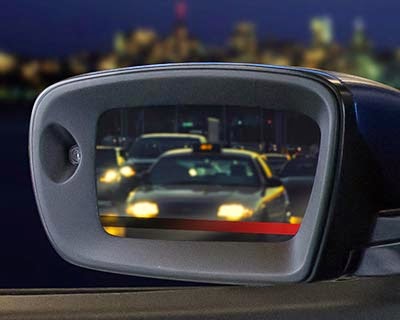
The Tom’s Guide award is the second honor QNX picked up at CES. We were also shortlisted for an Engadget Best of CES award, for the digital rear- and side-view mirrors on the QNX technology concept car.

If you haven’t seen the mirrors in action, they offer a complete view of the scene behind and to the sides of the vehicle — goodbye to the blind spots associated with conventional reflective mirrors. Better yet, the side-view digital mirrors have the smarts to detect cars, bicycles, and other objects, and they will display an alert if an object is too close when the driver signals a lane change.

In addition to the digital mirrors, the QNX technology concept car integrates several other ADAS features, including speed recommendations, forward-collision warnings, and intelligent parking assist. Learn more here.

Thursday, October 16, 2014

Attending SAE Convergence? Here’s why you should visit booth 513

Cars and beer don’t mix. But discussing cars while having a beer? Now you’re talking. If you’re attending SAE Convergence next week, you owe it to yourself to register for our “Spirits And Eats” event at 7:00 pm Tuesday. It’s the perfect occasion to kick back and enjoy the company of people who, like yourself, are passionate about cars and car electronics. And it isn’t a bad networking opportunity either — you’ll meet folks from a variety of automakers, Tier 1s, and technology suppliers in a relaxed, convivial atmosphere.

But you know what? It isn’t just about the beer. Or the company. It’s also about the Benz. Our digitally modded Mercedes-Benz CLA45 AMG, to be exact. It’s the latest QNX technology concept car, and it’s the perfect vehicle (pun fully intended) for demonstrating how QNX technology can enable next-generation infotainment systems. Highlights include:

  • A multi-modal user experience that blends touch, voice, and physical controls
  • A secure application environment for Android, HTML5, and OpenGL ES
  • Smartphone connectivity options for projecting smartphone apps onto the head unit
  • A dynamically reconfigurable digital instrument cluster that displays turn-by-turn directions, notifications of incoming phone calls, and video from front and rear cameras
  • Multimedia framework for playback of content from USB sticks, DLNA devices, etc.
  • Full-band stereo calling — think phone calls with CD quality audio
  • Engine sound enhancement that synchronizes synthesized engine sounds with engine RPM

Here, for example, is the digital cluster:


And here is a closeup of the head unit:


And here’s a shot of the cluster and head unit together:


As for the engine sound enhancement and high-quality hands-free audio, I can’t reproduce these here — you’ll have come see the car and experience them first hand. (Yup, that's an invite.)

If you like what you see, and are interested in what you can hear, visit us at booth #513. And if you'd like to schedule a demo or reserve some time with a QNX representative in advance, we can accommodate that, too. Just send us an email.

Monday, August 25, 2014

QNX Acoustics for Voice — a new name and a new benchmark in acoustic processing


Tina Jeffrey
Earlier this month, QNX Software Systems officially released QNX Acoustics for Voice 3.0 — the company’s latest generation of acoustic processing software for automotive hands-free voice communications. The solution sets a new benchmark in hands-free quality and supports the rigorous requirements of smartphone connectivity specifications.

Designed as a complete software solution, the product includes both the QNX Acoustics for Voice signal-processing library and the QWALive tool for tuning and configuration.

The signal-processing library manages the flow of audio during a hands-free voice call. It defines two paths: the send path, which handles audio flowing from the microphones to the far end of the call, and the receive path, which handles audio flowing from the far end to the loudspeakers in the car:


QWALive, used throughout development and pre-production phases, gives developers realtime control over all library parameters to accelerate tuning and diagnosis of audio issues:


A look under the hood
QNX Acoustics for Voice 3.0 builds on QNX Software Systems’ best-in-class acoustic echo cancellation and noise reduction algorithms, road-proven in tens of millions of cars, and offers breakthrough advancements over existing solutions.

Let me run through some of the innovative features that are already making waves (sorry, couldn’t resist) among automotive developers.

Perhaps the most significant innovation is our high efficiency technology. Why? Well, simply put, it saves up to 30% both in CPU load and in memory requirements for wideband (16 kHz sample rate for HD Voice) and Wideband Plus (24 kHz sample rate). This translates into the ability to do more processing on existing hardware, and with less memory. For instance, automakers can enable new smartphone connectivity capabilities on current hardware, without compromising performance:


Another feature that premieres with this release is intelligent voice optimization technology, designed to accelerate and increase the robustness of send-path tuning. This technology implements an automated frequency response correction model that dynamically adjusts the frequency response of the send path to compensate for variations in the acoustic path and vehicle cabin conditions.

Dynamic noise shaping, which is exclusive to QNX Acoustics for Voice, also debuts in this release. It enhances speech quality in the send path by reducing broadband noise from fans, defrost vents, and HVAC systems — a welcome feature, as broadband noise can be particularly difficult for hands-free systems to contend with.

Flexibility and portability — check and check
Like its predecessor (QNX Aviage Acoustic Processing 2.0), QNX Acoustics for Voice 3.0 continues to offer maximum flexibility to automakers. The modular software library comes with a comprehensive API, easing integration efforts into infotainment, telematics, and audio amplifier modules. Developers can choose from fixed- and floating-point versions that can be ported to a variety of operating systems and deployed on a wide range of processors or DSPs.

We’re excited about this release as it’s the most sophisticated acoustic voice processing solution available to date, and it allows automakers to build and hone systems for a variety of speech requirements, across all their vehicle platforms.

Check out the QNX Acoustics for Voice product page to learn more.

Tuesday, August 5, 2014

The summer road trip of 2017 — Part I

Lynn Gayowski
Lynn Gayowski
Summer is the season for many things — ice cream, outdoor festivals, heat waves, more ice cream, and perhaps best of all, hitting the open road. 2017 is around the corner, and between now and then, automakers will introduce a bevy of new features that will make for a safer and more enjoyable summer road trip. In this two-part series, we’ll take a look at how these technologies will help transform your summer road trip.

Tunes for the road
A road trip without a soundtrack is a road trip I want no part of. I think we can all agree that a Britney Spears playlist is compulsory. Music has always been intimately connected to the driving experience (see the Highway Hi-Fi Phonograph below for proof) and it’ll be even more integrated in the cars of 2017 with fewer limits. 


The media sources that you depend on today — local drives, USB storage devices, smartphones, cloud services — will work seamlessly with your vehicle, allowing you and your passengers to enjoy any genre from any source. Conventionally constrained to your center stack, music meta-data will permeate all the screens of your car, even the instrument cluster.


And for the backseat DJs, they’ll be able to use apps on their mobile devices to control the music playing in the car, which just might make the oft-repeated passenger phrase “Can you skip to the next song? I don’t like this one,” obsolete. Of course, to minimize distraction, the driver will always maintain cabin-wide control of what’s playing, and how loud it’s playing. 

The context-aware cockpit
The road trip of years past was plotted on a paper map and required a navigator in the passenger seat; today’s passengers are relieved of these duties as navigation and route plotting have gone digital. But even with that convenience, having to divert your eyes from the road to the center stack can be a nuisance. The dashboard of 2017 will offer greater convenience with a driver centric-display that could blend navigation and digital cluster information all on one screen. These vehicles will be "context aware" and display different information depending on the environment. For instance, surround-view cameras could detect pedestrians or cyclists and provide a minimalist on-screen alert to minimize driver distraction. Similarly, the system may disable certain functionality when the driver is about to navigate a hairpin turn. If the vehicle “knows” there’s a challenge ahead related to road condition, visibility, local speed limits, traffic, or topographical information, it could display the appropriate context-relevant information to the driver. 


Staying mobile
By 2017, you’ll probably have a new smartphone and, regardless of the platform, it’ll be able to communicate with your car. Projection mode technologies will be commonplace and render your phone’s display and services onto your car’s center stack (one example is QNX-powered Audi’s MMI mobile media application framework). This integration will no doubt get even more advanced in the coming years, and with Apple’s CarPlay and Google’s Android Auto connectivity protocols taking form, your favorite apps will be as at home on your dash as they are in your hand. 


Your phone will also be able to control and monitor your car in new ways via the much-discussed, but sometimes nebulous, cloud. For instance, let’s say you find yourself at a behemoth rest stop and can’t remember the location of your car after indulging in the roadside cuisine. Your phone’s “key fob” app could tell you exactly where your car is — it could even let you check your oil and washer fluid remotely to see if your car is in shape to make it on the next of your leg of your trip. 


How is in-car technology playing a role in your current summer road trip? How do you want it to improve your future road trips? What’s your favorite road trip destination? (My personal favorite is Washington, DC
) Stay tuned here for Part II, and to our QNX_Auto Twitter account and Facebook page for weekly discussions on what 2017 has in store for your road trip.


Thursday, June 26, 2014

QNX-powered Audi MMI framework to support Android Auto

This just in: Audi has announced that its Audi MMI mobile media application framework, which is built on the QNX CAR Platform for Infotainment, will support the new Android Auto connectivity solution.

The new feature will allow drivers to access Android-device car apps using Audi MMI displays and controls, which Audi has optimized for safe and intuitive operation on the road.

Audi states that the MMI system will still maintain its compatibility with other smartphones. Moreover, drivers will be able to switch between the Android view and Audi infotainment functions, as desired.

Audi is a long-standing customer of QNX Software Systems. Audi systems based on QNX technology include the recent Audi Virtual Cockpit and Audi Connect with Google Earth.

Audi plans to introduce Android Auto support in all-new models launched in 2015. For the complete story on Audi support for Android Auto, read the Audi press release.

Wednesday, June 18, 2014

Hitting the road with CNET on Cars

Derek Kuhn
Anyone who knows me knows that I am a huge fan of Brian Cooley and his CNET on Cars show. Brian brings energy, insight, and humor to his coverage of cars and car technology — he's a joy to watch. My son and I like the show so much that it has become a ritual to watch the latest episodes together.

Over the years, Brian has gotten behind the wheel of several QNX technology concept cars. For example, at 2013 CES, he got up close and personal with our concept car based on a Bentley Continental. And just last month, he took our latest concept car, based on a Mercedes-Benz CLA45, for a drive through the streets of San Francisco.

While I was in SF, Brian and I discussed the rise of 4G connectivity in vehicles and the benefits it will bring — including a better user experience and the ability to keep the car fresh with over-the-air updates. Brian included our conversation in his recent segment on 4G in the car — check out the video, below. The episode begins with a review of the new Audi A3, which, I am proud to say, also uses an infotainment system powered by QNX technology.


What are your thoughts on 4G connectivity in the car? I would love to hear from you.

Wednesday, February 12, 2014

Frankenstein and the future networked car

So what do Frankenstein and the future networked car have in common, you ask? Simple: both are compelling stories brought to life in Geneva, Switzerland.

In Mary Shelley’s Frankenstein the creature is seen climbing Mont-Salève after having fled Geneva during a lightning storm:

“I thought of pursuing the devil; but it would have been in vain, for another flash discovered him to me hanging among the rocks of the nearly perpendicular ascent of Mont-Salève.”

Mont-Salève, overlooking Geneva
Photo: Benoit Kornmann
Of course, the future networked car is a very different type of story, but compelling nonetheless. The laboratory in this story is the ITU Symposium on The Future Networked Car being held within the Geneva Auto Show on March 5 to 6, where many new ideas will be brought to life by convening leaders and technical experts from the automotive and ICT communities.

The event, organized by the International Telecommunications Union (ITU), will consist of high-level dialogues and several technical sessions; these include a session on integrating nomadic devices in cars, where I will discuss how technology standards can help minimize driver distraction. The dialogues will cover road safety and innovation for the future car, and will feature key leaders such as the presidents of Fédération Internationale de l’Automobile (Jean Todt) and Infiniti (Johan de Nysschen). The technical sessions will explore automated driving, connected car use cases, emergency services, and, of course, nomadic device integration. Speakers for these sessions come from a mix of automakers, tier one suppliers, ICT companies, standards development organizations (SDOs), industry groups, and government agencies.

The symposium also includes a session jointly organized by the ITU and UNECE Inland Transport Committee that deals with the human factors and regulatory issues introduced by automated driving. This session is an encouraging sign that the ITU and UNECE will continue the collaboration they started last June (see my previous post, “UN agencies take major step towards international standards for driver distraction”).

Hope to see you in Geneva!

Wednesday, December 18, 2013

The ultimate show-me car

The fifth installment in the CES Cars of Fame series. Our inductee for this week: a most bodacious Bentley.

It's one thing to say you can do something. It's another thing to prove it. Which helps explain why we create technology concept cars.

You see, we like to tell people that flexibility and customization form the very DNA of the QNX CAR Platform for Infotainment. Which they do. But in the automotive world, people don't just say "tell me"; they say "show me". And so, we used the platform to transform a Bentley Continental GT into a unique concept car, equipped with features never before seen in a vehicle.

Now here's the thing. This is the same QNX CAR Platform found in the QNX reference vehicle, which I discussed last week. But when you compare the infotainment systems in the two vehicles, the differences are dramatic: different features, different branding, different look-and-feel.

The explanation is simple: The reference vehicle shows what the QNX CAR Platform can do out of the box, while the Bentley demonstrates what the platform lets you do once you add your imagination to mix. One platform, many possibilities.

Enough talk; time to look at the car. And let's start with the exterior, because wow:


The awesome (and full HD) center stack
And now let's move to the interior, where the first thing you see is a gorgeous center stack. This immense touchscreen features a gracefully curved surface, full HD graphics, and TI’s optical touch input technology, which allows a physical control knob to be mounted directly on the screen — a feature that’s cool and useful. The center stack supports a variety of applications, including a 3D navigation system from Elektrobit that makes full use of the display:


At 17 inches, the display is big enough to display other functions, such as the car’s media player or virtual mechanic, and still have plenty of room for navigation:


The awesome (and very configurable) digital instrument cluster
The instrument cluster is implemented entirely in software, though you would hardly know it — the virtual gauges are impressively realistic. More impressive still is the cluster’s ability to morph itself on the fly. Put the car in Drive, and the cluster will display a tach, gas gauge, temperature gauge, and turn-by-turn directions — the cluster pulls these directions from the center stack’s navigation system. Put the car in Reverse, and the cluster will display a video feed from the car’s backup camera. You can also have the cluster display the current weather and current sound track:


The awesome (and just plain fun) web app
The web app works with any web browser and allows the driver to view data that the car publishes to the cloud, such as fluid levels, tire pressure, brake wear, and the current track being played by the infotainment system. It even allows the driver to remotely start or stop the engine, open or close windows, and so on:


The awesome (and nicely integrated) smartphone support
The Bentley also showcases how the QNX CAR Platform enables advanced integration with popular smartphones. For instance, the car can communicate with a smartphone to stream music, or to provide notifications of incoming email, news feeds, and other real-time information — all displayed in a manner appropriate to the automotive context. Here's an example:


The awesome everything else
I’ve only scratched the surface of what the car can do. For instance, it also provides:

  • Advanced voice rec — Just say “Hello Bentley,” and the car’s voice recognition system immediately comes to life and begins to interact with you — in a British accent, of course.
     
  • Advanced multimedia system — Includes support for Internet radio.
     
  • Video conferencing with realistic telepresence — Separate cameras for the driver and passenger provide independent video streams, while fullband voice technology from QNX offers expanded bandwidth for greater telepresence.
     
  • LTE connectivity — The car features an LTE radio modem, as well as a Wi-Fi hotspot for devices you bring into the car.

Moving pictures
Okay, time for some video. Here's a fun look at the making of the car:


And here's a run-through of the car's many capabilities, filmed by our friends at TI during 2013 CES:


Monday, November 11, 2013

RealVNC, QNX team up for mobile-to-vehicle connectivity

Paul Leroux
This just in: QNX and RealVNC have announced that they are collaborating to bring RealVNC’s implementation of the MirrorLink smartphone-to-vehicle connectivity standard to the QNX CAR Platform for Infotainment.

With RealVNC’s MirrorLink-certified SDK integrated in the QNX CAR Platform, QNX can offer a variety of connectivity features for integrating cars and smartphones through Wi-Fi, Bluetooth, and USB.

“We are delighted to work with QNX on integrating VNC Automotive into the QNX CAR Platform... many tier 1 and auto OEM customers are already using the proven combination of RealVNC and QNX technologies in production programs,” said Tom Blackie, VP Mobile RealVNC.

Read the full press on the QNX website.

Wednesday, August 28, 2013

Garmin taps QNX technology to create K2 infotainment platform

Complete digital cockpit delivers navigation, diagnostics, streaming media, smartphone integration, and voice recognition

Paul Leroux
This just in: Garmin International has selected the QNX CAR platform to power the Garmin K2, a next-generation infotainment solution for automakers.

Most people are familiar with Garmin's many portable GPS devices, from sports watches to action cameras to PNDs. But the K2 is a different animal altogether — a complete “digital cockpit” that comprises multiple digital displays, on- and off-board voice recognition, smartphone integration, and optional embedded 4G connectivity.

The K2 is designed to give drivers simple, intuitive access to navigation, vehicle diagnostics, streaming media, and realtime Web information. It's also designed with scalability in mind, so automakers can use it to address diverse market requirements and cost targets.

According to Matt Munn, managing director of Garmin’s automotive OEM group, “the QNX CAR platform has played a major role in helping us to achieve our goal of providing both world-class software reliability and flexible access to emerging consumer applications. From the proven stability and performance of the QNX architecture to the company’s worldwide industry recognition, QNX was the logical choice.”

Other key features of the K2 include a 3D-enhanced city model, a predictive services calendar, and remote personalization and control via a web portal or smartphone.

Here's the K2 at a glance:

Source: Garmin

And here's a demo of the system, filmed by Engadget at 2013 CES:


For more information on this announcement, read the press release. And for more on the K2 itself, visit the Garmin blog.


Thursday, May 9, 2013

Specs for Cars?

Tina Jeffrey
As Google Glass, the latest in experimental computer wearables, starts to make its way into the hands of select users, a multitude of use cases is popping up. For instance, a WIRED article recently explored the notion of your car being a ‘killer app’ for Google Glass. Now, you may not want to think of your car as a killer app, but let’s contemplate this use case for a moment.

Drivers wearing Glass could pair their new specs to their phone and instantly have a personal heads-up display (HUD) that overlays virtual road signs and GPS information over the scene in front of them. For instance:


Source: Google

Glass also understands voice commands and could dictate an email, display turn by turn directions, or set up and display point-of-interest destination data based on a simple voice command such as “Find the nearest Starbucks”.

This is all very cool — but does it bring anything new to the driving experience that isn’t already available? Not really. Car makers have already deployed voice-enabled systems to interface with navigation and location-based services; these services either run locally or are accessed through a brought-in mobile device and displayed on the head unit in a safe manner. ADAS algorithms, meanwhile, perform real-time traffic sign detection and recognition to display speed limits on the vehicle’s HUD. All this technology exists today and works quite well.

Catch me if you can
Another aspect to consider is the regulatory uncertainty created by drivers wearing these types of devices. Police can spot a driver with their head down texting on a cellphone or watching a movie on a DVD player. But detecting a driver performing these same activities while wearing a head-mounted display — not so easy. There’s no way of knowing whether the activities a driver is engaged in are driving related or an outright distraction. Unlike an HUD specified by the automaker, which is designed to coordinate and synchronize displayed data based on vehicle conditions and an assessment of cognitive load, a head-mounted display like Glass could give a driver free reign to engage in any activity at any time. This flies in the face of driver distraction guidelines being promulgated by government agencies.

Don’t get me wrong. Glass is cool technology, and I see viable applications for it. For instance, as an alternative to helmet cams when filming a first-person perspective of a ski run down a mountain, or in taking augmented reality gaming to the next level. (You can see many other applications on the Glass site.) But Glass is a personal display that operates as an extension of your cellphone, not as a replacement for a car’s HUD. Cars need well-integrated, useable systems that can safely enhance the driving experience. Because of this, I don’t believe that devices like Glass, as they are currently conceived, will garner a spot in our cars.

Monday, April 15, 2013

Enabling drivers to interact safely with applications and services

Since February 2011, QNX Software Systems has been leading an international standards effort to help drivers interact safely with applications and services. And not just apps on phones, but apps running in the cloud, in roadside infrastructure systems, in the car itself, and other locations.

If you jump to the end of this post, you’ll find a list of use cases being targeted by this effort. For now, let’s look at Use Case 2, Scenario A (arbitration of external message), which illustrates how we are working towards a comprehensive framework for managing distraction and workload.

Keeping priorities straight
In this user scenario, a navigation maneuver is given priority over a social media status update message. The blue call-out boxes indicate where the ITU-T recommendations under development can enable safe interaction between the driver and applications. For instance, ITU-T recommendation G.SAM will define mechanisms for prioritizing navigation, while G.V2A will define the communications interface between the app and the driver-vehicle interface (DVI), and P.UIA will recommend characteristics of the auditory social media message.

Remember that the focus here isn't on how to implement social media in the car, but rather, on how best to manage workload and distraction.


Giving a navigation maneuver priority over a social media status update message


Often, I am asked how this effort differs from the MirrorLink standard being developed by the Car Connectivity Consortium. The simple answer is that MirrorLink addresses only some of the use cases listed below. For instance, the scope of MirrorLink is limited to applications and services running on nomadic devices. Furthermore, adaptation of the driver-vehicle interface and external applications and services in the current MirrorLink solution uses a simple two-state approach, driving or not driving, which limits the ability of the vehicle to control the timing and modality of communications with the driver. Also, MirrorLink doesn’t adequately address arbitration or integration of communications with all external applications and services.

In for the long haul
At QNX Software Systems, our aim is to:
  1. Work with the relevant parties to identify solutions to the problem of technology-related driver distraction and workload. These parties include automotive, telecommunications, and consumer electronics organizations; standards development groups; academia; and government agencies.
  2. Determine which aspects of the solution should be standardized, then help drive this standardization.
  3. Align QNX product roadmaps as solutions develop.
To be clear, this is a longer term strategy that will take years to realize. Both the standardization process and the time it takes to deploy technology in vehicles must be factored in. Therefore, we are also pursuing shorter term solutions, some of which I hope to cover in future posts.

The end of the beginning
The first major milestone in this effort was achieved at the closing plenary of the ITU-T Study Group 12 meeting, held on March 28 in Geneva. Here, the final report and 4 deliverables of the ITU-T Focus Group on Driver Distraction were approved. There was also approval of a liaison statement communicating these results to a large list of organizations working on this topic.

This marks the end of the focus group, but is really just the beginning for QNX and ITU-T efforts in this area. In future posts, I will explore various aspects of this comprehensive strategy.


Use cases and user scenarios targeted by ITU-T recommendations

Use Case 1: Interaction with external application/service
   a) Application on nomadic device
   b) Application on cloud-based server
   c) Downloaded Application
   d) Broadcast of roadway information
   e) Tethering
Use Case 2: Arbitration and integration of external message
   a) Arbitration of messages
   b) Integration of messages
   c) Both arbitration and integration of messages
   d) E-call
Use Case 3: Negotiation of network Quality of Service (QoS)
   a) Application selects network
   b) Application suspends interaction
   c) Application availability due to roaming
Use Case 4: Management of multiple dialogues
   a) Opening/closing an application
   b) Switching between applications
   c) Interaction with background application
Use Case 5: Adaptation of DVI (driver-vehicle interface) and external applications/services to driver abilities
   a) Driver with disability
   b) Dynamically changing driver capabilities
   c) Detection of impaired driver state
Use Case 6: Adaptation of DVI and external applications/services to roadway situation
   a) Driver busy notification
   b) Delay of message delivery in demanding driving situation
   c) Change message format based on road conditions
   d) Interruption of driver interaction
Use Case 7: Adaptation of DVI and external applications/services to vehicle status
   a) Vehicle enters safe operating condition (e.g., park gear, < 5 m.p.h., etc.)
   b) Driver adjusts vehicle controls (e.g., climate control, etc.)
   c) Suppression of hazard alert due to safe speed
Use Case 8: Adaptation of DVI and external applications/services to local regulations
   a) Application blocked
   b) Application suspended
   c) Interface modality disabled
   d) Age restriction
   e) Content restriction

For details on these use cases, download the FG Distraction Use Cases report.

Monday, March 25, 2013

Traveling on reserve power

Or how a new kind of electro-mobility can be fun. A guest post from Thomas Fleischmann of Elektrobit Automotive.

Thomas Fleishmann
Imagine you are always driving on reserve power. You find this difficult? Get used to it — and welcome to the new era of electro-mobility! Vehicles like the Chevy Volt, with its secondary combustion engine, are already addressing this challenge — but having to support two types of driving technology can be challenging and costly.

So how can electro-mobility, which is supported by software, be implemented meaningfully? And how do we get drivers to accept it? Certainly not by abandoning the driver with nothing but a nicely animated display of the car’s battery condition.

Let's assume you live in a big city. You don’t even own a car. Instead, you subscribe to a certain number of hours of travel time with your favorite car brand. In addition to your S or XL subscription for four weeks a year, you get access to a fossil-fuel engine for your vacation in another state or country twice a year.

In the morning you find and reserve a car with your BlackBerry phone and get into it at a nearby charge-point. The HMI adapts to your profile settings automatically — your friends, contacts, addresses, and music are already there. The navigation system is your energy consultant; it tells you, based on traffic conditions and topography, how far you can drive with this car and, at the appropriate time, suggests an available electric socket within easy reach. Or the system warns you to turn back soon if you want to arrive home safely. After parking the car successfully, your smartphone guides you for the last few kilometers by bus or subway to your destination — it knows the way and easily adopts the data of your navigation system.

Using software solutions like EB GUIDE or EB street director and frameworks like the QNX CAR application platform you can concentrate on creating the end-user experience and transform the journey on reserve power into something fun and convenient — suddenly an electric vehicle becomes a smart mobility concept.

Check this out; I fried it last week. The yellow center represents the area in which you can drive and go back home. The white area represents the range you can drive, depending on traffic or topography:


Thomas Fleischmann is Senior Product Manager at Elektrobit Automotive responsible for the HMI solution EB GUIDE. Contact him at Thomas.Fleischmann@elektrobit.com.


Tuesday, November 27, 2012

What if…

Imagine if your car could help you become more connected to friends and family — and to the road ahead. Enter a new video that peers into the not-so-distant future.

It blows my mind, but some people still see connectivity in the car as the enemy. They think that, the more connected the car, the more distracting and dangerous it will be. But you know what? Responding to their concerns is easy. I simply ask them what if.

For instance, what if connectivity helped you drive with greater situational awareness? What if it helped you sidestep traffic jams and axle-busting pot holes? What if it helped you detect a stop sign hidden behind a tree? And what if it helped you become more connected to the people important to you, as well as to the road and the cars around you?

When we talk connectivity at QNX, that’s the kind of connectivity we envision. It isn’t just about Bluetooth or Wi-Fi or LTE — that’s only the plumbing. Rather, it’s about keeping you in tune and in sync with your car, your environment, your business, your friends. Your life.


Monday, November 5, 2012

Top 8 questions for squeezing high-end tech into low-end infotainment

A couple of weeks ago, I hosted a webinar that addressed the question, “Is it possible to build an infotainment system that meets today's customer demands with yesterday's price tag?” The webinar explored several ways to reduce RAM and ROM requirements, eliminate hardware, and share hardware, all with the goal of cutting BOM costs.

As always, the audience asked lots of great questions, several of which I have answered here. Of course, these provide only a hint of the ground covered in the webinar, so I invite you to download the archived version to get the full details.

Built-in phone module versus brought-in smart phone: what is your take on this, and is a hybrid approach feasible?
The approach will vary from automaker to automaker. I think that embedded phones will be required for certain cars, especially if they use systems that rely on cloud-based services. This approach adds to the BOM cost, of course, but it may reduce overall cost, depending on what features can be off-loaded to the cloud.

Some brands will encourage brought-in devices as the lowest-cost alternative. The consumer will then have to deal with the setup and maintenance issues required to pair or charge the phone. I don’t see a clear-cut analysis that says one method will be better than the other — it really depends on what you want to accomplish.

Any thoughts on using MirrorLink to clone a virtual display to a remote physical LCD?
If you’re talking about a remote (as in cloud-based) device, I would say that HTML5 is a much more natural choice for a server-based application. If it’s a brought-in device, then MirrorLink or HTML5 could be appropriate.

If GPS is moved to a brought-in phone, how will a stolen vehicle be located?
It won’t be, unless the phone was left in the vehicle. This is one of the trade-offs you make when trying to reduce cost.

Of the cost-saving techniques you discussed, which are most likely to be used?
Already, some system designers are removing wake-up micros and DSPs. I’m not aware of any systems where the LCD has been removed, but this approach would probably offer the largest cost savings, making it a likely choice for entry-level systems and cost-sensitive markets.

Security and reliability are the main concerns of a head unit. Squeezing high-end technologies into low-end systems won’t relax those expectations. For instance, smart phone integration will be an add-on instead of replacing functionality of the head unit. Thoughts?
The trade-offs will need to be communicated to the customer. You can never build a head-unit augmented with a smartphone that works as reliably as the head unit operating by itself. As an OEM or Tier 1, you just don’t have enough control over the brought-in devices.

As an industry, we need to educate consumers. If they start relying on the phone in the car to provide certain features, then they will have to expect an inevitable degradation in overall system quality. It comes back to that famous adage: “cost, quality, or time — pick two”.

MirrorLink has a defined communication interface to the head unit. You also mentioned HTML5 as an option. Is there a defined standard yet for transmitting the HTML5 up to the head unit?
The interface between web server (i.e. phone) and web client (i.e. head unit) is already well established and tested. For some specialized features (for instance, allowing HTML5 code to access vehicle services) some standardization may be required. This will hopefully be a topic of discussion in November, at the automotive HTML5 workshop hosted by the W3C in Rome. Some Connected Car Consortium members have also discussed the possibility that, in the future, MirrorLink could add a transport mechanism based on HTML5.

You discussed peripheral sharing, using QNX transparent distributed processing. Does QNX TDP require secure authentication between distributed boxes?
No, it does not. It relies on standard POSIX user group permissions to provide access rights to devices.

Can you discuss any trends you see regarding Ethernet or TCP/IP in the vehicle?
Ethernet is definitely becoming more interesting in the vehicle, due to the introduction of Ethernet AVB. It makes a very natural replacement for audio-video transmission over MOST, and the additions to AVB that fulfil strict timing requirements can replace CAN or MOST for non-media vehicle messages. Ethernet also has obvious advantages when you need to access Wi-Fi networks, cloud services, and mobile devices.

Tuesday, October 16, 2012

HTML5 SDK for the QNX CAR 2 platform — the back story

Kerry Johnson
Today, at SAE Convergence, QNX Software Systems announced the new HTML5 SDK for the QNX CAR 2 application platform. I’d like to provide some insight into this announcement, describe what you can expect to find in the SDK, and explain how it builds on the HTML5 capabilities already available in the QNX CAR 2 application platform.

Enabling apps for the car
Almost every consumer who owns a smart phone or tablet is familiar with the app experience: you go to an online marketplace, find apps of interest, and download them onto your device. With the HTML5 SDK, the automotive team at QNX is creating an analogous experience for the car.

Just as Apple, Android, and RIM provide SDKs to help vendors develop apps for their mobile platforms, QNX has created an SDK to help vendors to build apps for the QNX CAR 2 application platform. The closest analogies you will find to our HTML5 SDK are Apache Cordova and PhoneGap, both of which provide tools for creating mobile apps based on HTML5, CSS, JavaScript, and other web technologies.

App developers want to see the largest possible market for their apps. To that end, QNX also announced today that it will participate in the W3C’s Web and Automotive Workshop. The workshop aims to achieve industry alignment on how HTML5 is used in the car and to find common interfaces to reduce platform fragmentation from one automaker to the next. Obviously, app developers would like to see a common auto platform, while automakers want to maintain their differentiation. Thus, we believe the common ground achieved through W3C standardization will be important.

It bears mentioning that, unlike phone and tablet apps, car apps must offer a user experience that takes driver safety into consideration. This is a key issue, but beyond the scope of this post, so I won’t dwell on it here.

So what’s in the SDK, anyway?
As in any SDK, app developers will find tools to build and debug applications, and APIs that provide access the underlying platform. Specifically, the SDK will include:

  • APIs to access vehicle resources, such as climate control, radio, navigation, and media playback
  • APIs to manage the application life cycle: start, stop, show, hide, etc.
  • APIs to discover and launch other applications
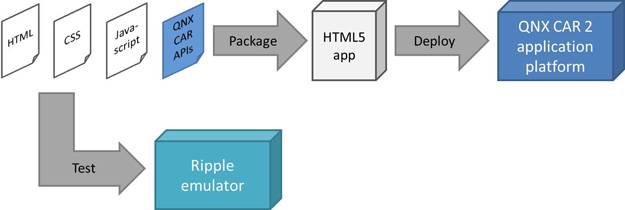
  • A packaging tool to combine application code (HTML, CSS, JavaScript) and UI resources (icons, images, etc.) with QNX CAR APIs to create an installable application – a .bar file
  • A emulator for the QNX CAR 2 platform to test HTML5 applications
  • Oh yeah, and documentation and examples

The development and deployment flow looks something like this:


Emulator and debugging environment
The QNX automotive team has extended the Ripple emulator environment to work with the QNX CAR 2 application platform. Ripple is an emulation environment originally designed for BlackBerry smart phones that RIM has open sourced on github.

Using this extended emulator, application developers can test their applications with the correct screen resolution and layout, and watch how their application interacts with the QNX CAR 2 platform APIs. For example, consider an application that controls audio in a car: balance, fade, bass, treble, volume, and so on. The screenshot below shows the QNX CAR 2 screen for controlling these settings in the Ripple emulator.


Using the Ripple emulator to test an audio application. Click to magnify.

In this example, you can use the onscreen controls to adjust volume, bass, treble, fade, and balance; you can also observe the changes to the underlying data values in the right-hand panel. And you can work the other way: by changing the controls on the right, you can observe changes to the on-screen display. The Ripple interface supports many other QNX CAR 2 features; for examples, see the QNX Flickr page.

You can also use the emulator in conjunction with the Web Inspector debugger to do full source-code debugging of your Javascript code.

Creating native services
Anyone who has developed software for the QNX Neutrino OS knows that we offer the QNX Momentics Tool Suite for creating and testing C and C++ applications. With the QNX CAR 2 application platform, this is still the case. Native-level services are built with the QNX Momentics suite, and HTML5 applications are built with our new HTML5 SDK. We've decided to offer the suite and the SDK as separate packages so that app developers who need to work only in the HTML5 domain needn't worry about the QNX Momentics Tool Suite and vice versa. Together, these toolkits allow you to create HTML5 user interface components with underlying native services, where required.

Monday, September 24, 2012

MirrorLink misunderstood: 8 myths that need busting

If you're new to MirrorLink, it's a technology that bridges the mobile phone and the car. It allows specially written apps running on the phone to be displayed on the car's head unit, where the user can interact with them.

MirrorLink is intended to extend the life of in-vehicle systems by allowing them to interact with mobile content and to support new features that didn’t exist when the car rolled off the assembly line.

Here's an illustration of how it works:


MirrorLink in-car communication. The protocol between the head unit and the phone can run over several transports, including USB, Bluetooth, or Wi-Fi. This example assumes Bluetooth for the audio back-channel.

When I talk to people in the automotive and mobile industries, I find they share a number of common misconceptions about MirrorLink, which I’d like to clear up. So let's get started, shall we?

  1. MirrorLink is an Android technology. In fact, MirrorLink works with multiple mobile platforms. Phones using Android can support it, but so can phones from any other phone maker that supports the standard. Even Apple phones could support it, though Apple has currently chosen to go their own route with Apple-specific solutions.

  2. MirrorLink allows any mobile app to run in the car. This is incorrect. A MirrorLink app can run in the car only if the car maker grants “trust” to that app. Each car maker has a different concept of what brands to promote, what features are safe, or what works well with each car. So, in reality, each app will be enabled depending on the individual make — or even model — of car.

  3. MirrorLink promotes “driver distracting” apps. Also incorrect. MirrorLink is an enabling technology that doesn’t promote any type of app in particular. In fact, because the car maker must grant trust to an app, the app developer can't control what apps run in the car. That responsibility remains the domain of car makers, who tend to avoid anything that will cause distraction when displayed on a front-seat screen.

  4. MirrorLink is the only way to connect an app to the car. There are in fact two others: iPod Out and HTML5. Apple supports iPod Out for Apple devices, which allows selected applications to output analog video to the head unit. (Note that the new iPhone 5 doesn’t support iPod Out.) HTML5 also allows mobile apps to run in the head unit, though its use in car-to-phone bridging is still in the early stages. QNX Software Systems has demonstrated concept vehicles that use BlackBerry Bridge (an HTML5-based technology) to connect an HTML5 app on a BlackBerry phone to the car’s head unit.

  5. Mobile app makers will benefit most from MirrorLink. In fact, car makers may end up taking best advantage of the technology. That’s because they can use MirrorLink to customize and create apps, and to refresh those apps as a way of delivering fresh, new functions to their customers. MirrorLink gives them the ability to do this using a standardized protocol supported by most mobile platforms. Car makers could use MirrorLink very effectively, even if they never allowed any third party apps into their cars.

  6. HTML5 and MirrorLink are incompatible. Not necessarily true. Current versions of MirrorLink use the VNC protocol to exchange graphical data. None of the advantages of HTML5 would be incompatible with a future version of MirrorLink; in fact, some members of the Connected Car Consortium (CCC), including QNX Software Systems, would likely be interested in merging these two standards. That would result in a new version of MirrorLink that uses HTML5 as the underlying communication protocol. (The MirrorLink specification is controlled by the Car Connectivity Consortium, of which QNX is a member.)

    Even if MirrorLink does go to HTML5, the industry would still need a VNC-based form of MirrorLink. VNC has much lighter requirements on the head-unit side, so it makes more sense than HTML5 if the car doesn’t have a high-powered CPU or lots of memory. The broadest possible option would be to have phone apps support multiple versions of MirrorLink (today's version with VNC plus a future version with HTML5) and to use whichever one makes sense, depending on what the car supports.

  7. MirrorLink obviates the need for car-downloadable apps. Yes, MirrorLink capability is somewhat similar in purpose to downloading apps into the car; they both extend the functionality of the car after it leaves the factory. Because the customer’s phone will almost certainly be newer than the car’s electronics, it will have a faster CPU, giving the raw speed advantage to a MirrorLink app on the mobile. The MirrorLink app will also have guaranteed data access since the hosting phone will always have a data pipe — something that isn't certain on the car side of the equation.

    On the other hand, MirrorLink doesn’t give an app access to car features that would available to a car-downloaded app — features such as vehicle bus access, telematics features, or the navigation system. Also, a car-downloaded app would likely have a faster HMI than any off-board app, even if the mobile had a faster CPU, because of latencies inherent to screen replication. The car-downloaded app would also have better visual integration, as it could take full advantage of the car features, instead of appearing as a bolt-on product. Other factors, based on automaker control, compatibility, or product roadmaps could also favor an in-car solution. Even if you could address some of these issues, there would still be enough reasons for MirrorLink and an auto app store to live side-by-side.

  8. MirrorLink apps can be built today. This is technically true. But, in their enthusiasm, new converts can sometimes forget that cars need to support MirrorLink for anything to actually work. Currently, only aftermarket car stereos support MirrorLink; no production vehicles support it. So if you’re a mobile app developer, the market for MirrorLink apps today is negligible. But expect this situation to improve dramatically over the next two to three years as production vehicles start to ship with this capability built-in.